
Last updated: November 13, 2026
Quick Answer: To adjust lumbar support on big and tall desk chairs, set the seat first, then place the lumbar pad at your lower-back curve, and fine-tune depth until support feels firm but not pushy.
Key Takeaways
- Set the seat slide plate, seat height, and back angle first so the lumbar pad lands where it should.
- Aim lumbar support at the natural lower-back curve, not the belt line or the ribs.
- Add lumbar depth until it fills the lower-back hollow, then stop before it pushes you forward.
- Seat depth and lumbar support must match; if one is off, the other cannot work well.
Big and tall desk chairs with lumbar support need a seat-height, depth, and backrest match before the lower back feels right. More lumbar is not the fix; the right height and depth for your pelvis and lordotic curve are.
The steps below show how to place lumbar support on How to Adjust Lumbar Support on Big and Tall Desk Chairs without guessing. For a broader chair overview, see the heavy-duty office chairs guide.
Start with the seat, not the lumbar pad

Picture this: you sit down in a big and tall office chair, the backrest feels tall enough, but your lower back still slides away from the support. Set the seat slide plate, seat height, and back angle first, or the lumbar pad will land in the wrong place no matter how you turn the dial.
Here’s the catch: many people try to fix low-back pressure by cranking the lumbar support before the seat is set. That usually shoves the pad into the wrong part of the spine. Better order? Seat depth first, lumbar second.
- Slide the seat pan so you can keep 2 to 4 fingers between the seat edge and the back of your knee.
- Set seat height so your feet stay flat and your knees are near 90 degrees. If the chair has a pelvic tilt mechanism, keep it neutral at first.
- Sit all the way back so your pelvis touches the backrest. This creates the base position for the lordotic curve.
- Only after that, reach for the lumbar adjustment.
The result you want is simple: your pelvis stays planted, and the lower back meets the support without you leaning forward to find it. If the chair has a long seat pan, this step matters even more for tall users, because the backrest contact point shifts when the seat is too shallow.
For broader context on chair families and support types, the hub guide to heavy-duty office chairs is the right next stop.
How do I place lumbar support on a tall person?
Place lumbar support where your lower back naturally curves, not at belt level and not up near the ribs. For most tall users, that means the pad sits a little higher than people expect, because the torso is longer and the backrest contact point moves up with it.
The common mistake is aiming the pad at the waistband. That feels “low” in the chair, but it often lands below the actual lordotic curve. The other mistake is setting it too high, where it presses into the lower rib area and makes you slouch around it.
Use these cues:
- Sit back with your hips touching the backrest.
- Slide the lumbar pad until it fills the small hollow just above the belt line.
- If the chair has height marks, start near the center mark, then move in small changes.
- If the support is fixed, use seat depth and back angle to bring your spine to it.
A tall person in a chair with a long back panel may need the support 1 to 2 inches higher than the first guess. That is not a rule for every body, but it is a useful starting point when the chair’s backrest is built for larger frames.
If the pad only hits one spot and leaves the sides unsupported, the fit may still be wrong. The goal is light contact across the lower curve, not one hard point that feels like a thumb in your back. A big and tall chair should spread that pressure across a broader lower-back area.
Adjust lumbar depth on a big and tall desk chair without overdoing it
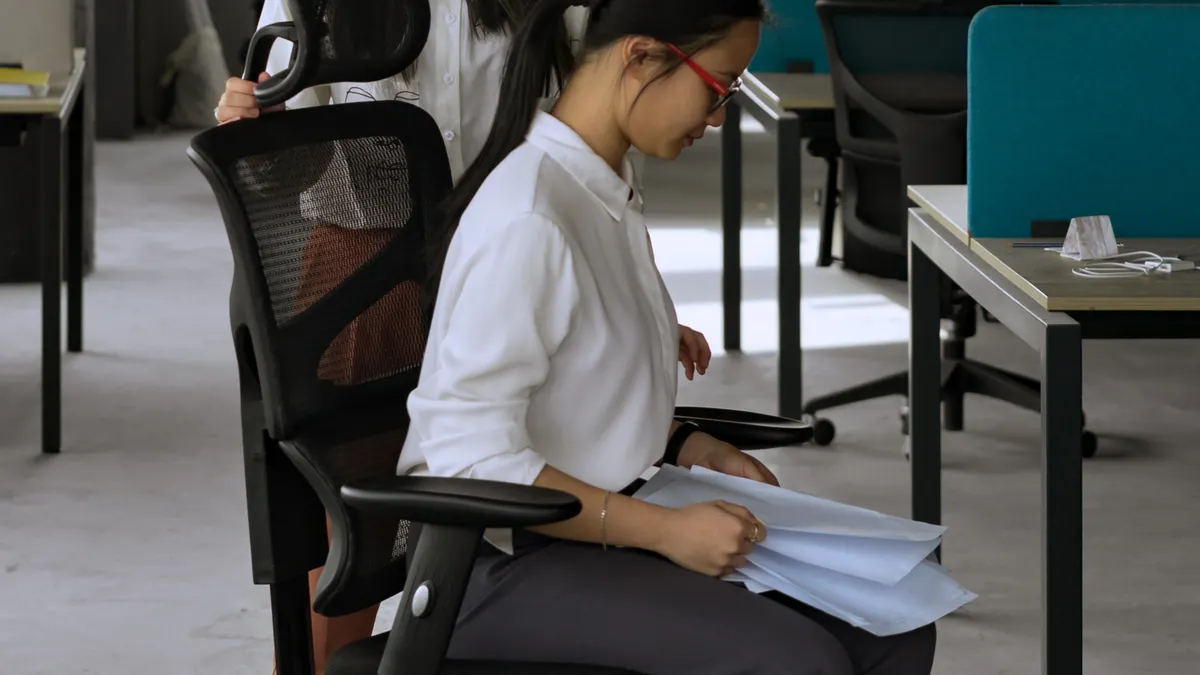
Adjust lumbar depth until the support fills the hollow of your lower back, then stop before it pushes you forward. On chairs with a lumbar depth dial, small turns matter more than big ones.
The first rule is to work in small changes. A deep pad can feel helpful for 30 seconds and then become the reason you keep shifting. That is especially common for heavy users, because the lower back may need firm contact but not a hard shove.
- Sit all the way back and flatten your feet on the floor.
- Turn the lumbar depth dial one small step or about a quarter turn if the chair uses a smooth knob.
- Hold that position for 20 to 30 seconds.
- If you still feel a gap, add a little more depth.
- If you feel pressure under the ribs, back it off one step.
The target is contact, not force. A properly set pad should keep your pelvis from rolling backward without making you arch your chest or flare your ribs. That is the whole point of matching lumbar support to a large frame.
On the flip side, too little depth gives you a hollow spot that invites slumping. Too much depth can trigger lower-back strain because your spine is being pushed into shape instead of supported in it. Too much depth can also make bariatric lower-back positioning feel harsh.
A good depth setting also changes how the seat feels. With the right contact, your weight spreads across the seat pan more evenly instead of dumping onto the tailbone. That is a useful clue when the chair has side bolsters or a firmer back shell.
Use seat depth and lumbar together for better pelvic support
Seat depth and lumbar support work as a pair; if one is off, the other can’t do its job. Picture yourself in a deep chair where the seat pan is set too far out. Your hips slide forward, and the lumbar pad ends up fighting that slide instead of supporting your spine.
This is where ergonomic chair depth setup heavy users often goes wrong. Big and tall chairs can have a long seat and a tall back, but if the seat slide plate is too far forward, the lower back loses the clean contact it needs. The backrest may feel “big enough” while the support still misses the curve.
Use these cues:
- If your knees are too close to the seat edge, shorten the seat depth.
- If your back loses contact when you sit back fully, deepen the seat or increase lumbar depth a little.
- If the pad feels too low after you fix the seat, raise the lumbar position before changing depth again.
- If you keep sliding forward, check whether the seat angle is tilting you off the backrest.
A practical test is to hold your position for 5 minutes without scooting. If you can stay planted, the seat and lumbar settings are working together. If not, the issue is usually seat depth before lumbar depth.
This matters for tall workers because long femurs change the way the pelvis sits. A chair that looks “correct” from the side can still fail if the seat pan is short or the lumbar is set against the wrong part of the back.
Which adjustment matters most: height, depth, or seat angle?
Lumbar height matters first, depth matters second, and seat angle keeps the whole setup from drifting. If the chair has all three, set them in that order, because each one changes where the lower back lands.
Here’s the practical version. Height places the pad at the curve. Depth controls how firmly it fills that curve. Seat angle, especially with a pelvic tilt mechanism, keeps your pelvis from tipping backward and flattening the spine.
A simple setup order works best:
- Set seat depth so the legs are supported without crowding the knees.
- Set the backrest angle so you can sit upright without holding yourself there.
- Set lumbar height so the pad meets the lower curve.
- Set lumbar depth until you feel steady support, not pressure.
- Fine-tune the seat tilt if you still slide forward.
Some chairs use a slider for lumbar position, while others use a mesh tension band or a fixed shell with a dial. The hardware changes, but the goal stays the same: keep the pelvis neutral enough that the lower back doesn’t have to do all the work.
Once the chair is matched to your frame, you usually do not need a big daily adjustment. Small changes are enough. If you find yourself re-setting it every hour, the seat depth or back angle is probably still off.
Common mistakes that make lumbar support feel wrong
Most bad lumbar setups come from trying to force the backrest to do the job of the seat. That leads to sore pressure points, forward head posture, and a lower back that still feels tired after an hour.
The biggest mistakes are easy to spot:
- Too high: the pad presses into the low ribs and makes you arch around it.
- Too low: the pad misses the curve and leaves a gap where slumping starts.
- Too deep: the support pushes the pelvis forward and feels harsh after 10 to 15 minutes.
- Too shallow: the support feels decorative, not useful.
- Seat too long: the thighs are pinned and the user slides out of the backrest.
- Seat too short: the user perches on the chair and never reaches the lumbar zone.
The cost of a bad setup is not just discomfort. It usually shows up as constant shifting, tighter hip flexors, and a back that never feels settled. So, big and tall desk chair setup should start from the seat pan, not from the lumbar knob.
Try this instead: adjust one thing at a time and sit for a few minutes before changing the next setting. That is slower, but it tells you which part of the chair is actually wrong. If a chair has a fixed lumbar shape that never lands in the right place, the problem is fit, not willpower.
For a technical reference on posture support concepts, the Ergonomics Society and OSHA both publish chair setup guidance worth reading, especially on neutral sitting and workstation fit. You can also compare setup tips with desk chair ergonomics.
When the lumbar pad still misses your back
If the lumbar pad still misses your back after the seat depth, seat height, and back angle are set, the chair may simply not match your torso length. That is common in big and tall seating, where the frame is strong but the lumbar zone is built for a different body shape.
A chair can be rated for large users and still fail a tall person with a long torso or a user whose pelvis sits deeper in the seat. In that case, the problem is not “weak lumbar support”; it is mismatched geometry.
Signs the setup is off:
- You have to shrug your shoulders to meet the backrest.
- The lumbar pad hits above or below the curve no matter how you adjust it.
- You keep sliding forward even with the seat slide plate set back.
- The backrest feels fine for 5 minutes, then irritating after 20 minutes or more.
At that point, stop chasing the same adjustment. Try a different chair profile with a taller back section, a different seat depth range, or a lumbar system that moves both vertically and in depth. That is the honest answer for some users.
This is also where wide-seat and heavy-duty chair design starts to matter, but this page is about adjustment, not chair shopping. If the chair fits the frame but not the back, the fix is setup first and replacement second.
The quickest setup order for better lower-back support
The fastest reliable order is: seat depth, seat height, back angle, lumbar height, then lumbar depth. That sequence gives the support a stable base before you fine-tune the lower back.
Use this as a final check:
- Feet flat
- Knees not pinned by the seat edge
- Pelvis all the way back
- Lower back touching the lumbar pad
- No hard pressure under the ribs
- No slide forward after several minutes
If all six are true, the chair is close. If one is off, do not keep turning the lumbar knob blindly. Go back to the seat pan and backrest first. That is where big and tall desk chair comfort is usually won or lost.
The goal is not a dramatic arch in your spine. It is steady support that lets you sit upright without fighting the chair. Once that is in place, the lower back feels lighter, the pelvis stays more neutral, and the chair stops demanding constant correction.
Where should lumbar support hit on a tall person?
Lumbar support should hit the lower curve of the back, usually just above the waistband, not at the ribs. For a tall person, that spot often sits higher than expected because the torso is longer and the backrest contact point moves up with it. If the pad presses the ribs, it is too high.
Should lumbar support be aggressive or flat for heavy body weight?
Lumbar support should feel firm, not aggressive. Heavy body weight does not mean the pad should push hard into the spine; it means the chair should hold the curve without collapsing under load. If the support feels like it is forcing your posture after 10 to 15 minutes, reduce depth or improve the seat setup.
Drafted with AI; not yet reviewed by a person.


4 thoughts on “How to Adjust Lumbar Support on Big and Tall Desk Chairs”