Direct answer: For a short, heavy body type, three specs matter more than style or price: a seat height that adjusts low enough to put your feet flat on the floor, a seat depth that leaves a small gap behind your knee, and a weight rating above your actual body weight. Checking all three together, not just one, is what makes a chair fit.
Key takeaways
- Seat height adjustability matters more than the listed range alone — you need the low end of that range to be low enough for your leg length.
- Seat depth and seat width solve two different problems: depth affects knee clearance, width affects hip and thigh clearance.
- A chair rated for a tall, heavy frame is not automatically right for a short, heavy frame — gas-cylinder stroke length and backrest height are built around standing height, not weight alone.
- The OSHA ergonomics checklist for office seating gives a usable, non-brand-specific test you can run on any chair in a showroom or living room.
- Use the weight-capacity and seat-width guides below once you’ve confirmed height and depth fit.
Why do standard chairs fail short, heavy body types specifically?
Most office chairs are designed around one assumption: that height and weight rise together. A taller body usually needs a lower seat-height range, and a shorter body usually needs a lighter weight rating. A short, heavy body breaks that assumption — you need the low end of a seat-height range matched to a shorter leg length, combined with a weight rating built for a heavier frame. Chairs that are marketed around only one of those two traits tend to miss the other.
This is why checking specs directly, rather than trusting a product category label like “big and tall,” matters. A chair spec’d for the opposite body type — for example, the tall-and-heavy chairs covered in our guide to chairs for people over 6’4″ — may have a seat-height range that never goes low enough. A chair labeled for a lighter weight class may use thinner-walled components that aren’t rated for sustained heavier loads. You need both numbers to line up for your specific body.
How do you check if the seat height is right for you?
The U.S. Occupational Safety and Health Administration’s computer workstation guidance gives a simple, chair-agnostic test: the chair height is appropriate when the entire sole of the foot can rest on the floor with the back of the knee slightly higher than the seat of the chair. OSHA does not publish one universal number in inches, because leg length varies — it describes the test instead of a single measurement.
Run this test while sitting in the chair, not by reading the spec sheet alone. Lower the seat all the way. If your feet are still not flat on the floor, or your knees are pushed up higher than your hips, the chair’s adjustable range does not go low enough for you, no matter how tall its “maximum height” number looks on a listing.
How deep should the seat be for a shorter body?
OSHA’s seating guidance also covers depth: the seat pan should be depth-adjustable to support most of the thigh, without contact between the back of the knee and the front edge of the seat pan. In practice, this means sitting all the way back against the backrest and checking for a small, clear gap — not a large one — between the seat edge and the back of your knee.
For a shorter body, a fixed seat depth that was designed for an average or taller leg length often pushes the front edge of the seat into the back of the knee, which restricts circulation and causes the familiar “feet don’t quite reach, knees are jammed” discomfort. Seat-depth adjustment (sliding the seat pan forward or back) fixes this independently of seat height, which is why it is worth checking as its own spec rather than assuming a shorter seat automatically solves it.
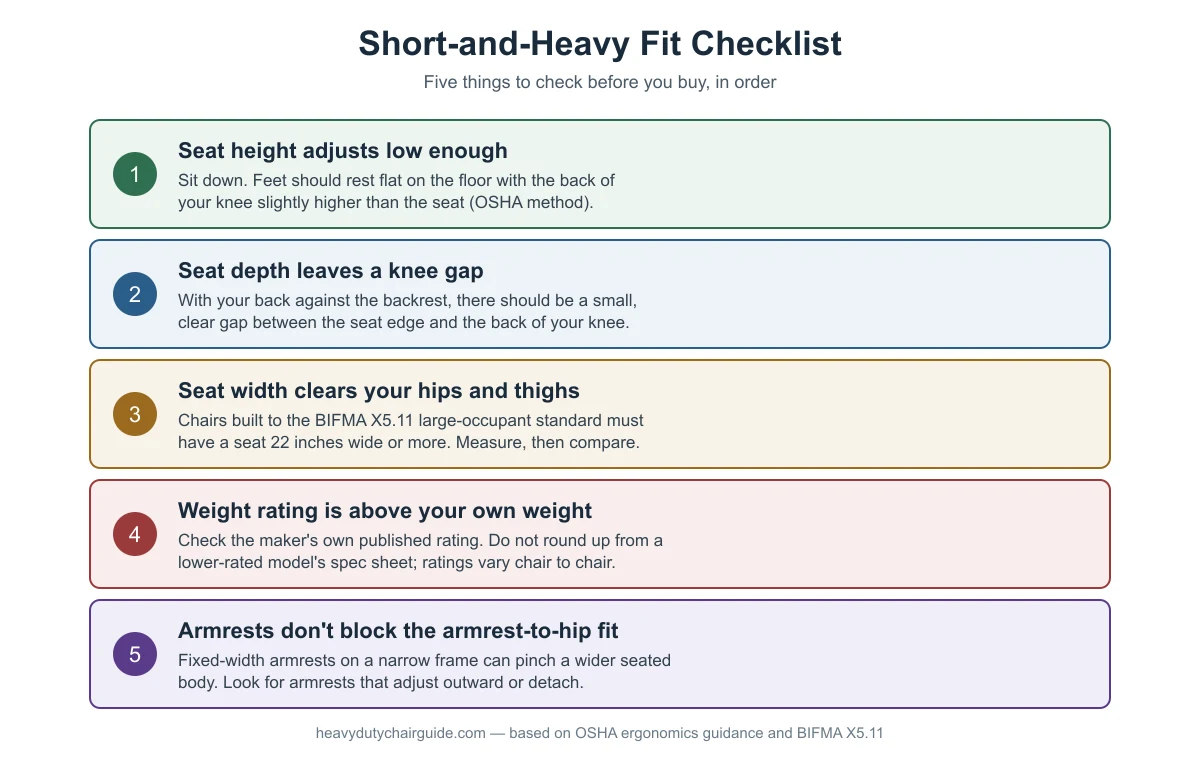
Self-test checklist: five things to check in order
The graphic below walks through the checks in the order that matters: height and depth first (they determine basic comfort and circulation), then width and weight rating (they determine whether the chair holds up and fits), then armrests last (a secondary comfort factor that is easy to overlook).
| Check | What you’re testing | What it tells you | If it fails |
|---|---|---|---|
| Seat height, lowest setting | Feet flat, knee slightly above seat (OSHA method) | Whether the adjustable range reaches low enough for your leg length | Look at the chair’s listed minimum seat height, not just the maximum |
| Seat depth | Small, clear gap behind the knee when seated back | Whether the seat pan is too long for your thigh length | Look for a depth-adjustable (sliding) seat pan |
| Seat width | Hips and thighs don’t touch the seat edges or armrest posts | Whether the frame itself is wide enough, independent of weight rating | See the seat width measuring guide |
| Weight rating | The maker’s published number compared to your own weight | Whether the internal hardware (cylinder, frame, base) is built for sustained heavier load | See the weight capacity explainer |
| Armrest clearance | Armrests don’t pinch hips when seated | Whether fixed-width arms fit a wider seated body | Look for armrests that adjust outward, or a model without arms |
Does height range matter more than weight rating for a short, heavy frame?
They solve different problems, so neither one “matters more” — both have to pass. A chair can have an excellent weight rating and still be unusable if its lowest seat height setting is still too high for your legs. A chair can fit your height perfectly and still sink, wobble, or fail early if its internal hardware was not built for your weight. Confirm height and depth fit first, since those are quick to test by sitting in the chair; then confirm the weight rating and seat width, since those require checking the spec sheet.
For the weight-rating side specifically, standard general-purpose office chairs are generally built around a 275 lb reference user under the ANSI/BIFMA X5.1 testing standard, while chairs built to the ANSI/BIFMA X5.11 “large occupant” standard are tested around users up to 400 lb and must have a seat 22 inches wide or greater. That seat-width requirement is relevant here too — a short body carrying more weight in the hips and thighs can need that wider seat even if overall height is unremarkable.
What about armrests and base width?
Fixed armrests mounted close to the seat edge are a common, overlooked fit problem for wider seated bodies regardless of height. If the armrest posts sit inside the natural width of your hips, they will press inward when you sit down, which is uncomfortable over a full workday. Look for armrests that adjust outward (not just up and down), or consider an armless model if your desk height allows it.
A wider five-point base with the casters spread farther from the center column also improves stability for a heavier seated load, independent of the user’s height — this matters more for stability than for fit, but it’s worth checking alongside the other specs since a short, heavy body sitting upright puts load straight down through the center column.
What does a good fit actually look like at a desk?
Once height, depth, width, weight rating and armrests all check out individually, sit at your actual desk and work for a few minutes, not just in the showroom. Confirm your forearms rest level on the desk surface with the chair at the height you tested, and that your feet stay flat on the floor without needing to perch on the edge of the seat. A chair that passes every spec on paper can still feel wrong at your specific desk height, which is the final, practical check before you commit to a purchase.

Frequently asked questions
Is a “big and tall” chair the same thing as a chair for a short, heavy person?
No. “Big and tall” chairs are usually built with a higher seat-height range and taller backrest for taller users, which can leave the lowest seat-height setting too high for a shorter body. Check the chair’s minimum seat height specifically, not just its weight rating, before assuming a big-and-tall model will fit a shorter frame.
Why does my chair feel fine at first but uncomfortable after an hour?
This is often a seat-depth problem rather than a seat-height problem. A seat pan that’s slightly too long presses on the back of the knee over time, which restricts blood flow and causes numbness or discomfort that builds gradually rather than being noticeable immediately. OSHA’s seating guidance specifically calls out knee contact with the front seat edge as something to avoid.
Do I need a specific “petite” chair line, or can any chair work if the specs fit?
Any chair can work if its actual measured specs — seat height range, seat depth, seat width, and weight rating — match your body, regardless of how the product is marketed. “Petite” and “big and tall” are marketing categories, not guarantees; always check the listed numbers yourself.
Should I prioritize weight rating or seat height if I can only check one in a showroom?
Seat height and depth, since those can only be confirmed by sitting in the chair. Weight rating and exact seat width are usually printed on a spec sheet or tag, so you can check those later from the listing even if you can’t test them physically in the store.
Sources
- OSHA, Computer Workstations eTool — Chairs
- Micom Laboratories — ANSI/BIFMA X5.1 testing summary
- Micom Laboratories — ANSI/BIFMA X5.11 testing summary
heavydutychairguide.com Editorial Team. Last updated: November 13, 2026.


One thought on “Office Chairs for Short, Heavy Body Types: What to Check”